Contact Us
Frequently Asked Questions About Our Self-Paced Classes
1. I'm having trouble with my course. I can't move to the next lesson or access the final quiz. What should I do?
If you’re using Microsoft Edge, try switching to Google Chrome for a better experience. (https://www.google.com/chrome/)
- 1. Log out of your account
- 2. Clear your browser cookies/cache (Need help? Click here)
- 3. Close and reopen your browser
- 4. Visit ecoursesforcourt.com
- 5. Log back in and try again
2. Are there any conditions or qualifications I need to meet to be able to take court-ordered classes online?
3. I’ve completed my course, but can’t find my certificate. How can I get it?
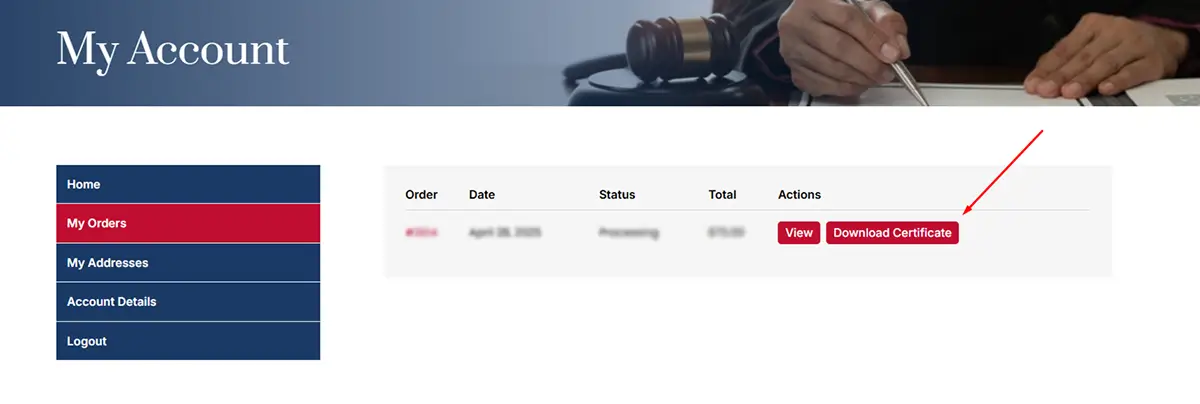
Situation 1. If you’ve fully completed your course but didn’t receive the certificate via email, it could be due to a technical issue. In this case, you can easily download your certificate by following these steps:
Situation 2. Sometimes users get logged out during the course, and when they log back in, they may think they’ve completed the course, even though some lessons or the final quiz are still incomplete. So, in this situation, please make sure that all lessons and the final quiz are 100% completed. Only then will you be able to download your certificate or receive it via email.
4. Will I receive a Certificate of Completion after finishing the course?
5. What happens if my court or probation officer requires proof of completion?
6. How do I change my Name on my account?
- 1. Go to the My Account page.
- 2. Log in to your account.
- 3. Click on Account Details.
- 4. A form will open—enter your new first and last name.
- 5. Click Save to apply the changes.
7. The name on my certificate is incorrect. How can I fix it?
After completing the quiz, there will be a conclusion page at last where you’ll need to enter the Certificate Holder Name. This name will be displayed on your certificate.
8. Do I need to spend the exact number of hours mentioned on the certificate?
9. What forms of payment can I use to pay for my court-ordered class?